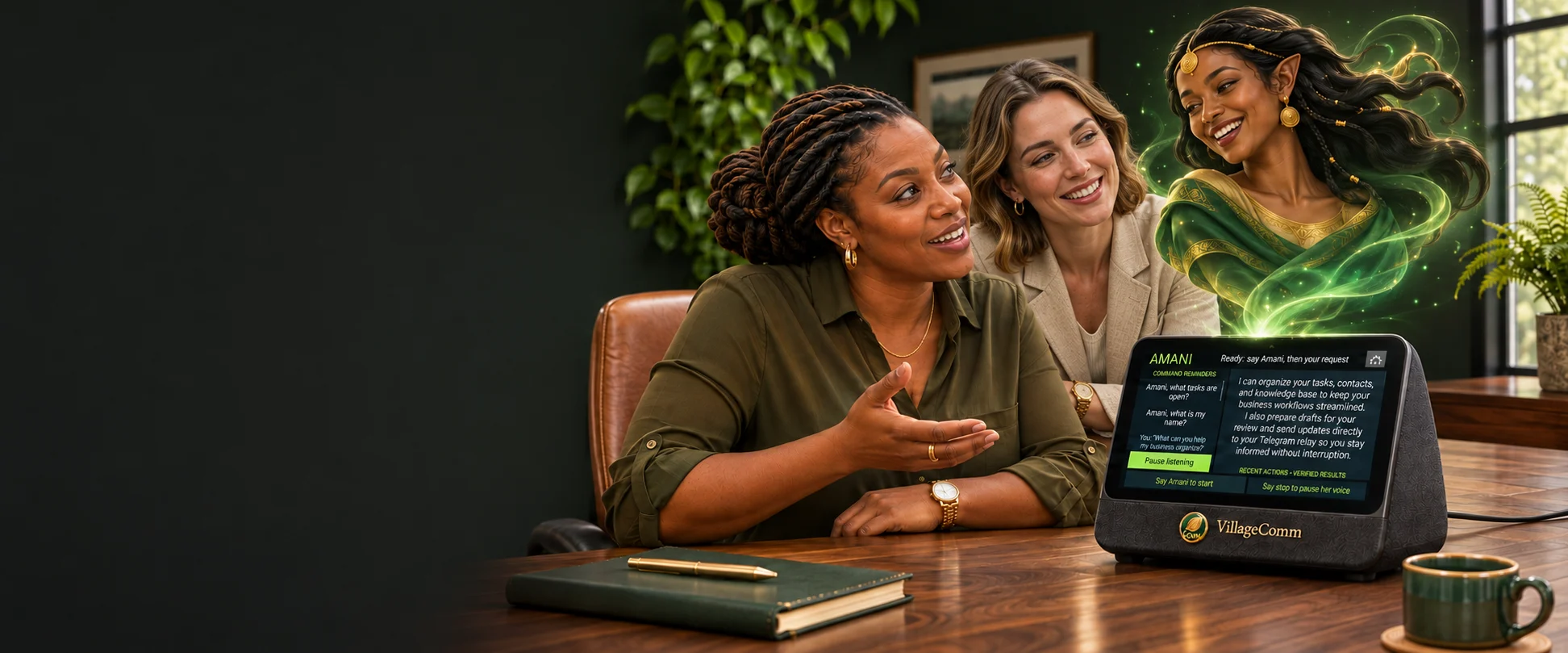
Amani, can you help with my follow-ups?
 AMANI / VILLAGECOMM
Of course. I can review new inquiries and prepare replies for you to approve.
Meet Amani.
A clearer day.
Meet Amani, the personal and business assistant at the heart of your VillageComm station. Speak naturally, keep useful knowledge close, and turn daily conversations into work you can review—from your station, Telegram or your phone.
building what’s next.
On your desk.
Part of your day.
Speak to Amani through your VillageComm station. See the conversation, check what she’s working on, and stay in control of the next step.
VILLAGECOMM OPERATED BY AMANI●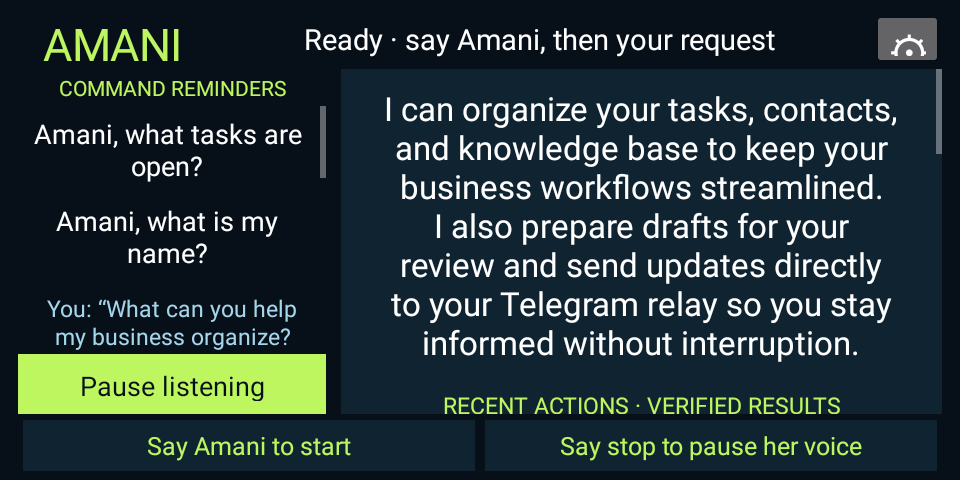
One conversation.
A useful next step.
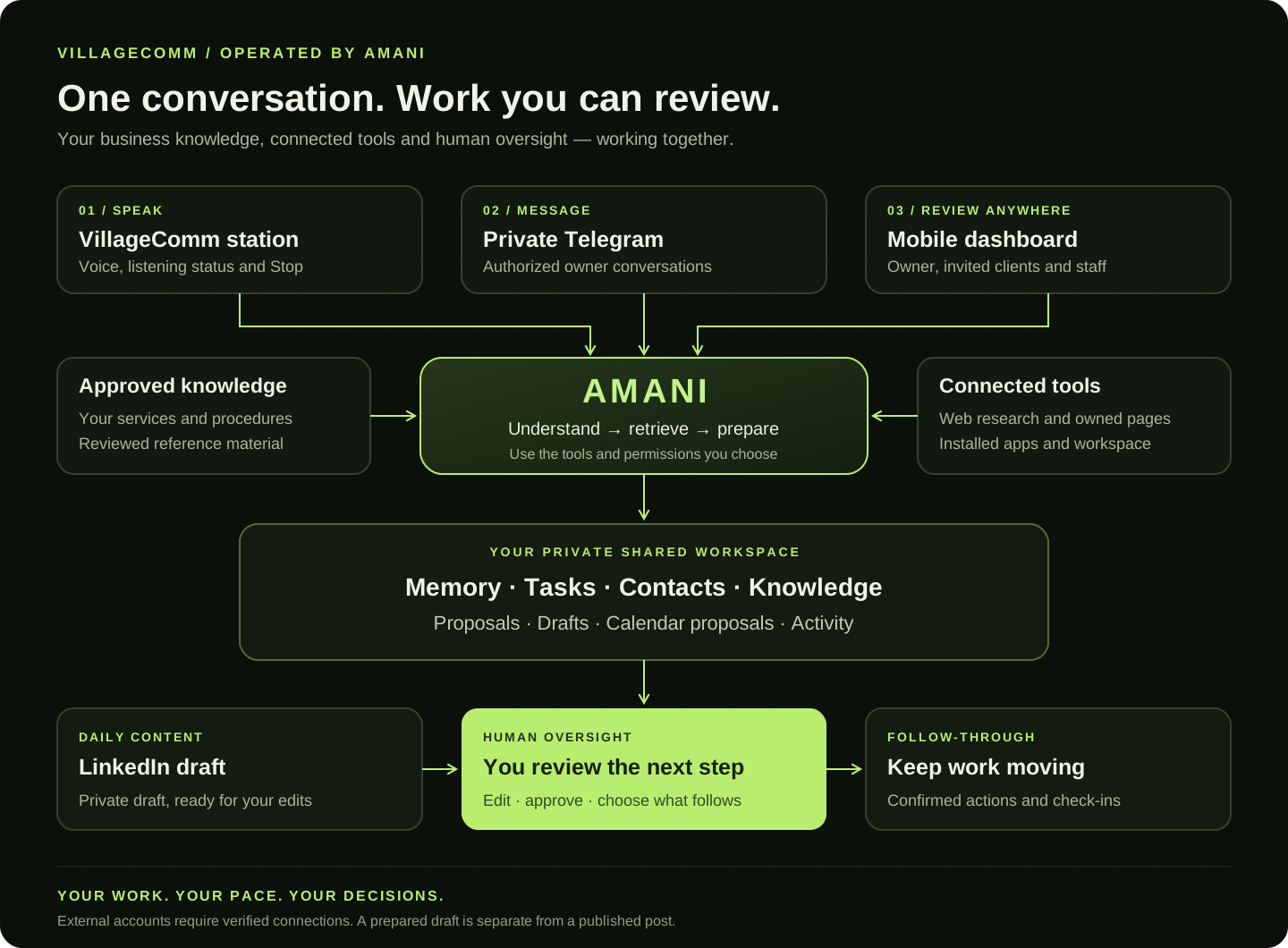
Amani connects voice, knowledge and a private workspace so useful work has somewhere to go—and you can see what actually happened.
Speak at your pace.
See when Amani is listening, recognizing or preparing a reply. Choose a three- or six-second pause, and interrupt when you need to.
Keep the context.
Maintain useful facts, tasks and next steps across your station and private Telegram. Review and correct what matters.
Research with purpose.
Search the web and consult approved business knowledge or your connected landing pages before shaping the next step.
Make a useful draft.
Prepare proposals, notes, follow-ups and daily LinkedIn content in your private dashboard. Review the wording and see confirmed tool results.
Stay connected.
Reach Amani through your authorized Telegram connection and use the mobile workspace when you are away from the station.
Bring people together.
Use invited client and staff rooms for conversations, shared next steps and calendar proposals, with clear participant roles.
Move between apps.
Open installed apps, web links and YouTube. The floating VillageComm microphone keeps your assistant within reach.
Follow through.
Keep unfinished work on a durable task list. Scheduled check-ins review what is due and what still needs your attention.
Configured around your business, your information and the tools you choose.
Different businesses.
One helpful presence.
Every business has a different rhythm. Explore how a trained Amani could support your team and the people you serve.
TAILORED TO YOUR BUSINESS · PEOPLE STAY IN CONTROL
More time for the human side.
Help your team organize incoming questions, prepare follow-ups, and find the right information—so conversations don’t get lost in the shuffle.
See the conversation.
Stay in control.
Real screens from VillageComm, operated by Amani. Tap a screen for a closer look.
The current VillageComm interface keeps your request, reply and progress in view.
The stage and elapsed-time counter show when your request is being processed, with a clear cancellation control.
Choose the listening pace that suits you, including six seconds of quiet between thoughts.
Your ideas.
A clear path forward.
Speak or type, bring the right information into view, and review the work before it moves forward. One shared workspace keeps the next step close.
Your business.
A clearer way to move it forward.
An assistant is most useful when she knows the business, has the right tools and works with people who can make decisions. The Amani package brings those pieces together around the owner.
Human oversight
You set the priorities. People review important proposals, external communications and business decisions.
Amani, prepared for your business
Prepare Amani with your business knowledge, services and working procedures, with a guided handover built around your priorities.
One place to review the work
A workspace designed around drafts, follow-ups and decisions, with a mobile-friendly layout for business owners on the move.
A conversation at the center of your day.
Speak to Amani on the VillageComm station. Her connected owner workspace keeps tasks, shared facts, text knowledge and contact follow-ups available across VillageComm and private Telegram.
A place for the owner to see the whole picture.
Explore how your business work comes together—from proposals and drafts to contacts, calendars and strategy.
A proposal worth reviewing.
- 01Discovery summary → scope of work
- 02Service options → proposal draft
- 03Owner review → approve the next step
Example: a service proposal prepared from an approved customer brief.
Keep the work, the decision and the outcome clear.
Amani organizes.
Specialists contribute.
You stay in charge.
Amani’s SEO specialist reviews the public page and prepares a private draft. Further specialist roles can be configured around your business, with clear responsibilities and owner review.
SEO & visibility
Review the public page, identify search-intent themes and prepare content suggestions in the owner’s Drafts. Publishing remains under owner control.
Operations & customer care
Organize website inquiries, meeting notes, calendar requests and follow-up tasks.
Research & strategy
Review approved business information, explore revenue ideas and prepare evidence-based action plans.
Start with the work that makes a difference.
Your first-month roadmap: understand the business, train and connect the agreed workflows, review real drafts together, then improve what works. Delivery dates depend on scope and integrations; business growth is a goal, not a guaranteed result.
Understand
Goals, approved knowledge and responsibilities.
Prepare
Configure Amani and test the selected workflows.
Work together
Review drafts, follow-ups and owner decisions.
Improve
Measure outcomes and choose the next useful capability.
Useful in the details.
Specific to your business.
A clearer path from first inquiry to follow-up
Insurance
A busy insurance office depends on clear information and timely handoffs. Amani can be trained on approved service descriptions, office procedures and common questions to help prepare the next step.
Welcome an inquiry
Collect the type of inquiry and the person’s preferred contact method. Help the team understand what the customer needs before a callback.
Prepare the conversation
Find relevant approved information, summarize questions and draft a response for the team to review.
Keep follow-ups visible
With a connected task system, track the agreed next step and highlight inquiries awaiting attention.
Example workflowA customer asks what to bring to an appointment. Amani uses the office’s approved checklist to prepare a clear answer and flags any question that needs the licensed team.
Coverage decisions, recommendations and binding policies remain with appropriately authorized professionals.
More room for people, less time sorting information
Elder care
Care teams and families need clear, considerate communication. Amani’s role is to support routine coordination using approved information, with careful limits around personal information.
Answer everyday questions
Help explain visiting arrangements, service information and how to reach the right team member.
Support family communication
Organize non-emergency inquiries and draft respectful updates for authorized staff to review.
Coordinate the next step
With approved scheduling tools, prepare appointment details and reminders. Confirm what was actually saved.
Example workflowA family member asks about an introductory visit. Amani explains the approved process and helps prepare a request for the team to arrange the visit.
This is administrative support, not clinical judgment, diagnosis, emergency monitoring or a replacement for a caregiver.
Useful information around your physical space
Ruview wireless security sensors
Sensor data becomes more useful when people can understand what happened and what needs attention. Amani can be configured to organize information from compatible, authorized sensor connections.
Explain a device or event
Help authorized users understand approved device descriptions and available event information.
Summarize activity
With a tested integration, group incoming events into a readable summary with timestamps and source details.
Prepare a human response
Highlight events for review and draft a maintenance or follow-up request. Preserve uncertainty when a device is offline or information is incomplete.
Example workflowA sensor reports an event repeatedly. Amani could summarize the pattern and prepare a check request for an authorized operator, rather than declaring a confirmed incident.
The sensor connection and supported event types must be validated. This presentation does not claim live monitoring, guaranteed detection or emergency response.
Clear explanations, thoughtful practice
Tutoring
Amani can support tutors and learners with explanations and practice drawn from approved teaching material, while the tutor sets the learning goals.
Prepare a session
Turn a topic and learning objective into an outline with examples and questions.
Work through an idea
Explain a concept in different ways and offer guided practice rather than simply supplying an answer.
Keep useful learning notes
Save agreed learning goals and next steps in the owner’s workspace when requested.
Example workflowA tutor shares an approved lesson on fractions. Amani prepares a simple explanation, a practice sequence and questions the tutor can adapt.
A teacher or tutor reviews learning material and any assessment. Do not upload student personal information without appropriate authorization.
Consistent preparation for practical skills
Training
Trainers can use Amani to turn approved procedures and course material into clear sessions, exercises and follow-up resources.
Structure the material
Organize learning objectives, a session agenda and a checklist of required resources.
Prepare realistic practice
Draft scenarios, discussion questions and knowledge checks for trainer review.
Support follow-through
Record requested actions and search the approved knowledge library for relevant instructions.
Example workflowA team is onboarding new staff. Amani drafts a session plan from an approved process guide and records the trainer’s requested follow-ups.
Training design support does not itself confer a qualification or verify that a person is competent to perform a regulated or hazardous task.
A second perspective for builders
Coding
Amani can help developers reason about requirements, understand code and prepare proposed solutions. Access to repositories or execution environments must be connected deliberately.
Clarify the problem
Break a feature request into behaviors, edge cases and acceptance checks.
Review and explain
Discuss supplied code, identify possible issues and draft changes for developer review.
Plan verification
Suggest meaningful tests and explain what remains unverified when code has not actually run.
Example workflowA developer supplies a function and describes a failing case. Amani explains a possible cause and drafts a focused fix and test plan.
The private workspace added here does not enable unrestricted terminal access, repository changes or automatic deployment.
Support for authorized defensive work
Cybersecurity
Amani can assist cybersecurity professionals with clear documentation and analysis of information they are authorized to share.
Organize defensive reviews
Turn approved requirements into a checklist covering accounts, access, updates and recovery.
Explain findings
Help translate supplied findings into understandable risks and proposed remediation steps.
Prepare the response
Draft incident-response playbooks and awareness exercises for the responsible team to validate.
Example workflowAn authorized team supplies a sanitized security finding. Amani drafts a remediation checklist and questions for the system owner.
This is assistance for authorized defensive work, not a claim of certification, continuous monitoring or guaranteed security.
Each business setup uses agreed information, permissions and integrations, with people responsible for review and decisions.
Make Amani
your own.
Every great assistant starts by understanding the work. Build a useful foundation, connect the right tools, and keep people in control.
Give her context.
Introduce your business, your services, and the information your team relies on.
Bring in your tools.
Connect the services and workflows you choose as those integrations become available.
Build on what works.
Review outcomes, improve instructions, and expand Amani’s role with your business.
Useful today.
Ready to grow.
Michael’s connected Amani workspace now supports persistent tasks, shared facts, searchable knowledge notes and contact follow-up activity. The private owner workspace is available through your VillageComm station, authorized Telegram and the mobile dashboard. Website visitors speak with a separate presentation guide.
Michael’s Assistant answers here using the presentation information. Your conversation stays separate from the private owner workspace.
Get to know
your assistant.
Useful answers before you bring Amani into your business.
Does Amani prepare marketing content automatically?+
The connected owner setup prepares one LinkedIn draft each day from the public product information. It is saved privately for review and editing. The drafting service needs its configured computer online; publishing to LinkedIn requires separate authorization and remains under owner control.
How do I speak to Amani?+
Say “Amani” followed by your request. Her status and elapsed-time display show the current stage. The patient listening setting allows six seconds of quiet before finishing your turn. Say “Amani, stop” while a request is waiting, or “stop” while she is speaking.
Can I use Amani away from my station?+
Yes. Your private Telegram connection and mobile-friendly owner workspace provide another way to stay involved. Invited clients and staff use their assigned workspace access; your private assistant feed is not open to website visitors.
What can Amani remember?+
Your connected workspace stores editable facts, tasks, next steps and approved knowledge. You can review important facts, correct them, and remove records through the owner controls.
How do calendars and email fit in?+
Amani can prepare event details and shared workspace calendar proposals, and draft communications for review. Gmail, Google Calendar booking and joining Zoom meetings require separately configured and verified integrations.
Who approves the work?+
You set the priorities and retain control of important decisions. Internal drafts are kept separate from sending or publishing, and Amani reports an action as complete only when its tool returns confirmation.
Can a specialist help with SEO?+
The owner can request a focused SEO review of this public page. The specialist prepares observations, priorities and content suggestions in the private draft workspace. Publishing stays under owner review; search rankings and traffic gains depend on useful content, discovery and ongoing measurement.
Your next chapter.
Let’s build it together.
Tell us about your team, the work you want to simplify, and where you’d like Amani to help. We’ll follow up with you personally.
Business inquiries, demonstrations and partnership opportunities.